For classrooms
One countdown.
The whole class flies.
Vivapse is a rocket simulator students program themselves. Classroom mode turns it into a lesson: set a mission, collect every flight, and launch the class together from mission control on the projector.
A lesson
From a class code to a gradebook.
Four steps, and the playground does the bookkeeping: who flew, how well, and when.
- 01
Open a class
Buy seats and get a class code. Students join with a name and the code — no email address, no password to choose.
- 02
Set the mission
Set a flight up in the playground — rocket, launch site, weather seed, a starter program if you like — and post it with a brief, a due date and a pass mark.
- 03
Everyone flies it
Students fly it as often as they want and hand in the flight they stand behind. Same seed, same weather, same rocket: a fair test.
- 04
Review, replay, grade
Every score, outcome and landing in one table. Replay any flight, write feedback, download the lot for your gradebook.
Live launches
Mission control, on the projector.
Open a live launch and start the countdown. Every student who is ready launches at T-0 — on the server's clock, so the class leaves the pad together. Tracks, roster and leaderboard fill in as they fly.
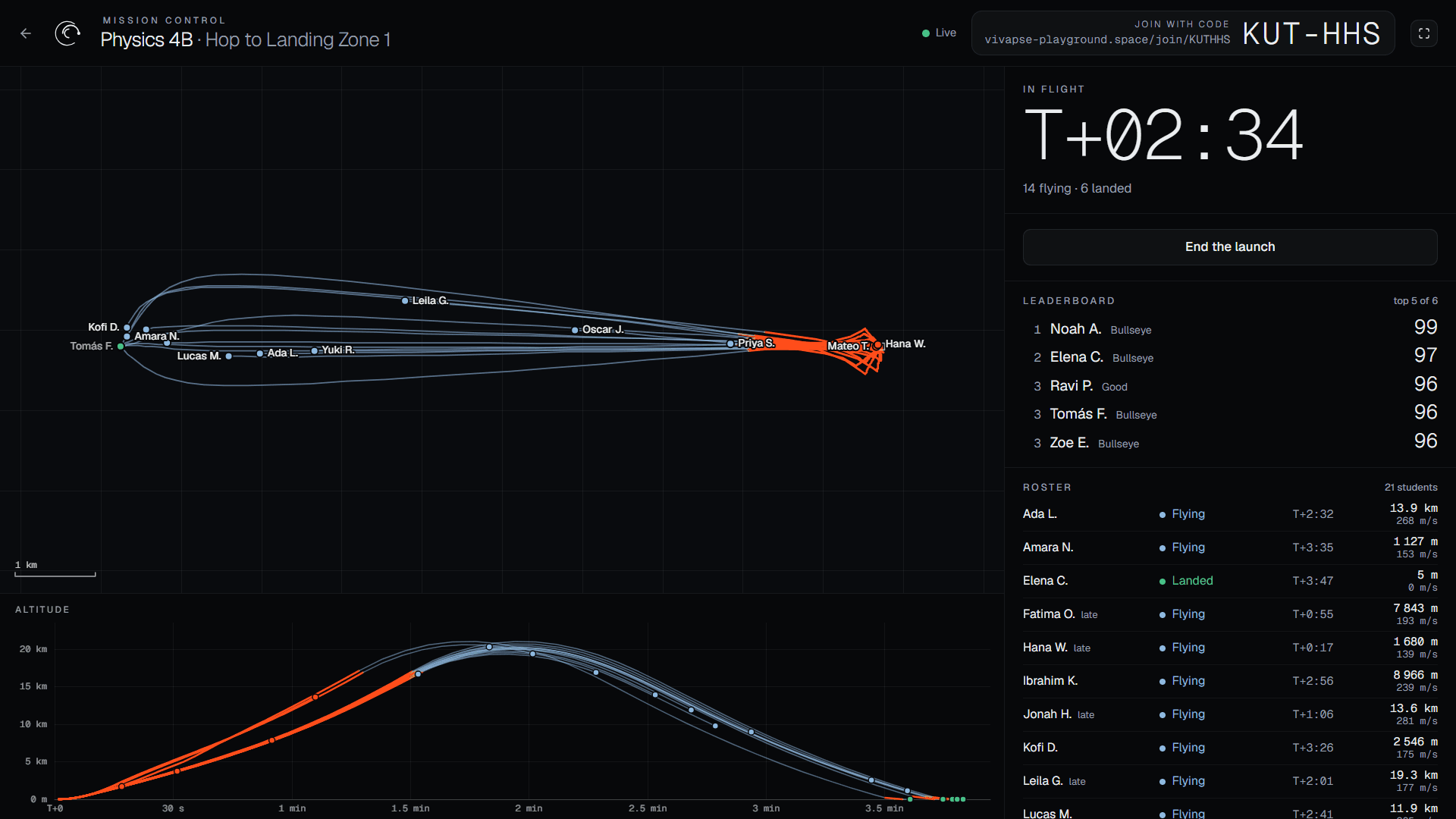
- 1The countdown, then the class clock — on the server's time, so everyone launches together
- 2Every student's track, on a map that fits the flight; orange where the engines burn
- 3Everyone's altitude against time
- 4The leaderboard fills in as flights end
- 5The roster: waiting, ready, flying, landed or offline, with altitude and speed
- 6The class code and join link, large, for latecomers
Assignments
Every flight handed in, every flight replayable.
Post a mission with a due date and a pass mark. Students hand in the flight they want graded; you see the whole class in one table.
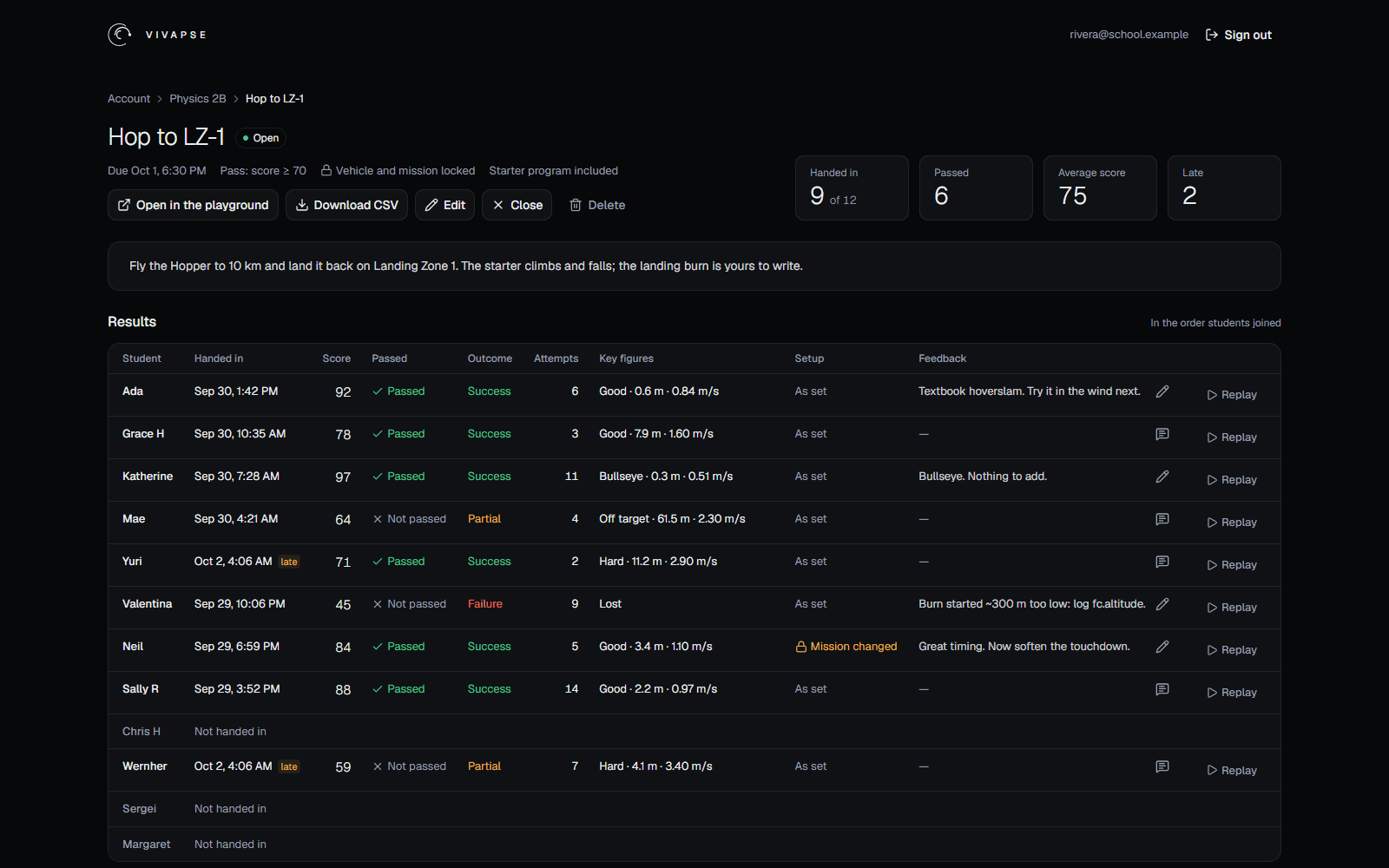
- 1The due date and the pass rule — here a score of 70, with the rocket and the mission locked
- 2The whole table as a spreadsheet, for your gradebook
- 3The class at a glance: hand-ins, passes, the average score, late ones
- 4Your feedback, which the student sees next to their score
- 5Replay any hand-in: the same rocket, mission and program fly again
- 6One row per student: score, pass, outcome, attempts and how the landing went
- 7Late hand-ins are accepted and marked
- 8A flight flown on a different setup is flagged, not hidden
- Same conditionsOne weather seed
- The assignment fixes the seed, so every student flies into the same winds, gusts and sea state.
- Same hardwareLocked setup
- Lock the rocket, the mission or both. A hand-in flown on something else is flagged, not hidden.
- ReplaysDeterministic
- A hand-in carries the rocket, the mission and the program. The simulator is deterministic, so a replay flies the same flight again.
- Pass markScore and outcome
- Pass on a minimum score, on mission success, or both. Late hand-ins are accepted and marked late.
Made for students
Nothing about them we do not need.
Your students are minors, so classroom mode keeps as little as it can. The full list is in the privacy notice.
No student emails
A student is a name inside your class and a sign-in code. Nothing else is asked for.
Live tracks last a day
During a live launch, positions pass through our server to your screen. A simplified track stays up to 24 hours so you can reload mission control, then it is deleted.
Hand-ins stay in the class
Only you see a student's hand-in and program. Remove a student and their work goes with them.
No ads, no tracking
No advertising, no analytics following students around. Payment goes through Stripe; we never see a card.
Seats
A school year, per pack.
Classroom mode comes with every class: assignments, replays and mission control are not extras. The 17 courses stay free for everyone.
For teachers and schools
Class of 10
$15per school year
- Ten student seats for twelve months
- Students join with a class code — no email address
- Remove a student to free the seat for another
For teachers and schools
Class of 20
$25per school year
- Twenty student seats for twelve months
- Packs add up: buy more for a larger class
- The teacher manages the class and its sign-in codes
Prices in USD. Taxes may be added at checkout depending on where you are. All prices · Terms of sale
Questions
Before the first lesson.
- What do students need?
- A computer with a recent browser and WebGL. There is nothing to install: the playground runs in the page.
- Do students have to write code?
- A flight is flown by a short JavaScript program. Students can start from the playground's example programs and change a number at a time, and you can hand them a starter program with the assignment. The courses take them from there.
- What if the school network is strict?
- Assignments and hand-ins are ordinary web requests. Live launches also need a WebSocket connection to the playground; where a network blocks it, students fly and hand in as usual and mission control shows who it cannot reach.
- Can I see how a student flew?
- Yes. A hand-in carries the student's rocket, mission and program. Watch the replay in the playground, read the program, and leave feedback the student sees next to their score.
- What happens when the seats expire?
- Students lose access to the playground; the class, its assignments and its hand-ins stay. Buy another pack for the same class and everyone is back where they were.
- A larger class, or several?
- Packs add up: a class of 30 is a pack of 20 and a pack of 10. A teacher can run several classes, each with its own code, assignments and mission control.